
1
Get Your Lemlist Campaign ID
Navigate to your Lemlist campaign where you want to get leads. The URL will look something like this:Copy the campaign ID that starts with
cam_ (e.g., cam_XKr8ipzAWa4Psc475).2
Navigate to InGrow Integrations
From your InGrow dashboard, go to the Integrations page and locate the Signals Webhook section.
3
Connect the Webhook
Click the “Connect” button to open the webhook configuration modal.
4
Configure the Webhook URL
In the Webhook URL field, enter the following URL, replacing Optional enrichment parameters: If you want additional data enrichment, add these parameters to the URL:The complete URL with enrichment would look like:
<campaign_id> with the campaign ID you copied in Step 1:5
Set Authentication
- Select Basic from the Header Type dropdown
- Leave the Username field empty
- In the Password field, enter your Lemlist API key
6
Enable Toggles
Turn on toggles based on your requirements.
7
Configure JSON Schema Fields
Configure your JSON schema payload mapping exactly as shown in the image below: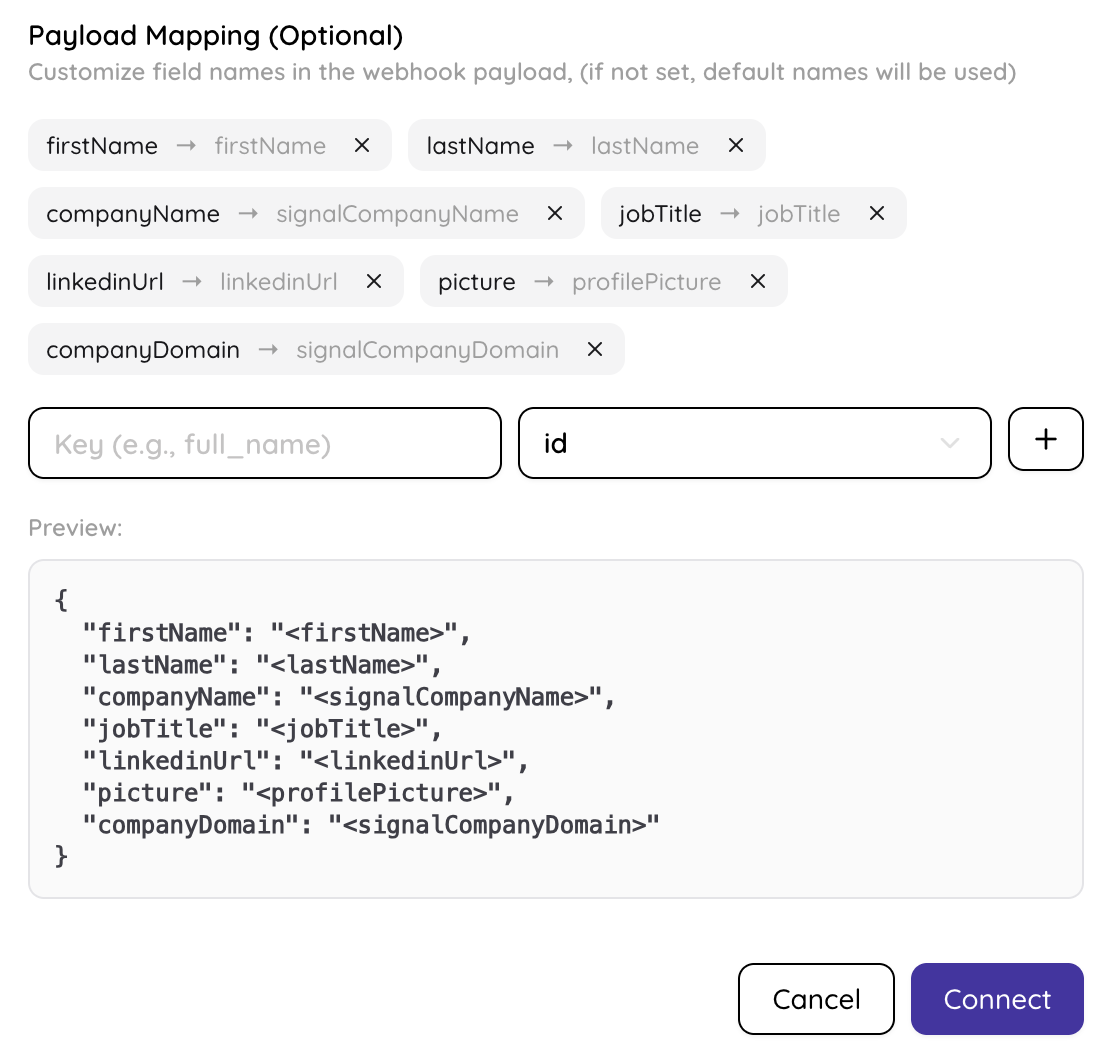
8
Save and Activate
Click the “Connect” button to activate the webhook. InGrow will now begin sending leads to your Lemlist campaign automatically.